
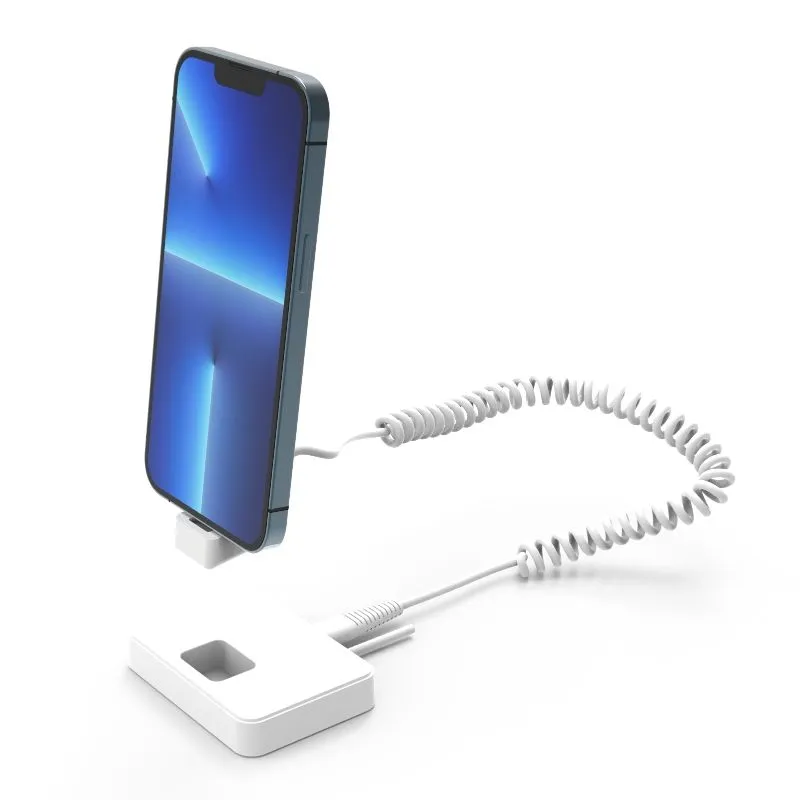
A phone anti-theft display stand is not only a product on a catalogue page. It is a small retail system that has to fit the device, let customers interact with it, protect it during that interaction, keep it powered, and remain practical for store staff.
That is why two buyers asking for a phone security display stand may need completely different configurations. One may be preparing a countertop display for a few standard smartphones. Another may be fitting a high-traffic flagship store with multiple phone sizes, remote alarm control, stronger mounting and branded packaging.
This checklist is designed for retailers, distributors, integrators and OEM buyers preparing a quotation request. It focuses on the information that affects model selection and project risk. It does not replace a sample test or a supplier confirmation for a specific device and configuration.
Direct answer: what should I confirm before buying wholesale?
Confirm the device model list and case, how customers and staff will handle the phones, the mounting surface, charging method, alarm workflow, sample requirements, quantity by store, packaging, quotation scope and destination assumptions.
Before approving a bulk order, ask the supplier to confirm model-specific compatibility, sample acceptance criteria, MOQ, lead time and commercial terms in writing. Keep any item that has not been verified as an open project requirement.
In this guide
Start with a procurement brief, not a model number
A model number is useful after the requirement is clear. At the beginning of a project, it is more useful to describe the display environment. A good brief tells the supplier what the customer must do with the phone, what the store must control, and what the buyer needs to approve internally.
A practical starting sentence
“We need to display [device models] in [store/fixture type], allow customers to [handle/charge/compare] the devices, use [standard or higher] security, and evaluate [sample quantity] before a rollout of approximately [quantity] units.”
The Tocvue phone and tablet security display range separates everyday Pavo configurations from higher-security Titan options. That separation is useful for procurement because the correct choice depends on device, store traffic, mounting and operating process—not just the word “anti-theft.” For supplier shortlisting, also review the retail security display stand manufacturer page and compare its stated scope with your project brief.
The 10 questions to answer before requesting a quote
1. Which exact devices will be displayed?
Prepare a model list instead of writing only “mobile phones.” Include brand, model, screen size, body dimensions, weight if relevant, camera position, buttons, port position and whether a protective case will remain on the device.
Different phone bodies can require different adhesive pads, clamps, sensor positions or cable routes. If several generations will share one display, identify the largest and smallest device and ask whether one configuration can accommodate both. Send photographs or dimension drawings when the model is new or not yet available to the supplier.
2. What must the customer be able to do?
Define the intended interaction: pick up the phone, rotate it, compare several models, test the camera, connect headphones, use a charging cable, or simply view a powered-on screen. A stand that is secure but blocks the port or limits the required movement may fail the retail objective.
Describe the display zone as well. Countertop, wall, island, endcap and open-plan flagship fixtures create different cable-management and mounting requirements.
3. What security level is appropriate?
Use the store scenario to define the security requirement. Consider product value, store traffic, staff visibility, distance to the exit, local theft patterns, fixture strength and whether the display is supervised continuously.
Everyday standalone displays may be suitable for ordinary phone and tablet counters. Higher-risk or open-plan environments may require a stronger mechanical structure, retractable cable, different clamp family or a higher alarm configuration. Review the Titan high-security range separately instead of assuming that one Pavo model fits every zone.
4. How should the phone remain powered?
State the connector and charging expectation: USB-C, Micro USB, Lightning, wireless charging or no charging. Confirm whether the phone must remain powered while it is lifted and handled, whether the charging connector is replaceable, and how the cable will be routed through the fixture.
Charging performance must be confirmed for the selected model and device. The Pavo page lists USB charging on relevant configurations and wireless charging on selected models; those details should be checked against the actual phone, case and power adapter before bulk approval.
5. How will staff arm, disarm and respond to alarms?
Ask how the alarm is triggered, how staff silence it, where the remote is stored, and what happens after a cable or sensor connection is disturbed. A loud alarm is only one part of the operating process. Staff need to know which display triggered, how to inspect the device, and how to restore the system.
Current Tocvue pages describe Pavo configurations with alarm and IR or wireless remote control. Treat alarm level, remote type and operating range as model-specific items to verify in the quotation rather than as a universal series promise.
6. How will the stand attach to the phone and fixture?
Confirm whether the device uses adhesive, a clamp, a bracket, a retractable cable or a combination. Then confirm how the base attaches to the countertop or display furniture: adhesive, screw mount, slot, rail or a custom fixture interface.
Ask for the required flat area, base dimensions, cable exit position and removal process. A fixture can be secure while the base is poorly positioned, or the phone can fit while the store furniture cannot support the installation.
7. What quantity and store pattern are you planning?
Separate the number of display points from the number of stores. Note how many phones each store will display, whether different zones need different models, and how many spare units or spare cables should be planned.
A mixed deployment may be more practical than forcing one stand everywhere. Standard phones, larger devices, premium models and demo units can have different security and charging requirements. Create a simple model-by-zone list so the supplier can quote the real configuration rather than an average unit.
8. Will you approve a sample or pilot first?
For a new device, new fixture or new supplier, a sample test reduces avoidable bulk-order risk. The sample should use the real device, the intended case, the intended charger and a representative piece of store furniture whenever possible.
Agree on the acceptance checks before the sample is shipped. A sample that only looks correct in a product photograph is not enough evidence for a rollout.
9. What packaging, branding and documentation do you need?
State whether the project needs a logo, color, private-label packaging, installation instructions, spare-parts labels, barcode labels or carton marks. Packaging decisions can affect artwork approval, packing method, accessory separation and shipment planning.
Ask for the documents needed by the buyer and installer: product dimensions, installation steps, power requirements, remote-control instructions, spare-parts list and sample acceptance notes. Do not request a certification or compliance claim unless the exact product and destination requirement have been verified.
10. What commercial and after-sales details must be confirmed?
Before comparing quotations, define the commercial questions: sample availability, MOQ, production schedule, trade term, destination, packaging, freight responsibility, payment milestones and import-clearance responsibility. These items can change the real project cost even when the unit price is unchanged.
Also ask how replacement cables, clamps, charging connectors, remotes and other service parts are handled. A retail rollout needs a practical recovery path when a device model changes or a component is damaged.
Match the requirement to the system
The table below is a planning framework, not a substitute for a model-specific quotation. Its purpose is to expose the decisions that should be made before price comparison.
| Procurement requirement | What to confirm | Evidence to request |
|---|---|---|
| Device fit | Model, dimensions, case, camera and port positions | Fit check, dimensions or sample photos with the real device |
| Customer handling | Lift, rotate, compare, camera test and cable travel | Short handling test on the intended fixture |
| Security level | Alarm method, sensor loop, clamp, cable and staff response | Model specification and alarm-response demonstration |
| Power | Connector, wireless option, adapter and cable route | Charging test with the target device and case |
| Installation | Base, screw/adhesive method, furniture and service access | Installation drawing and fixture compatibility check |
| Rollout | Units per store, store count, mixed models and spares | Model-by-zone quantity sheet and spare-parts proposal |
| Commercial scope | Sample, MOQ, lead time, packaging, terms and destination | Written quotation with scope and assumptions |
Turn the checklist into a sample acceptance test
A pilot should answer the questions that a catalogue cannot answer. Keep the test short enough for store staff to repeat and specific enough for procurement to approve.
Install every target device, including the case if one will be used in store.
Handle, rotate and return the phone as a customer and as a staff member would.
Confirm charging, connector access and cable movement during normal use.
Trigger the system using the agreed test method and record staff response steps.
Check base stability, cable routing, service access and visual alignment.
Replace or reconnect the tested component and confirm the display returns to service.
What a sample cannot prove by itself
A sample cannot automatically prove long-term durability, universal device compatibility, production consistency or performance in every store. Those claims require an agreed test scope, production controls and project-specific confirmation.
Prepare a quote-ready request
Copy the following structure into an enquiry and attach a device list or fixture drawing. It gives a supplier enough context to recommend a model and makes competing quotations easier to compare.
For a first review, include the device list, target quantity and destination even if some details are still open. The supplier can then identify the missing decisions instead of sending a generic catalogue.
Final checklist before you compare prices
- Have I listed exact device models and cases?
- Have I explained how customers and staff will handle the phone?
- Have I defined the store fixture and mounting surface?
- Have I confirmed charging and connector requirements?
- Have I separated standard and higher-security display zones?
- Have I requested a sample test where fit or installation is uncertain?
- Does the quotation clearly state accessories, packaging, quantity, terms and destination assumptions?
- Is there a spare-parts and after-sales plan for the rollout?
FAQ
What information should I send when requesting a quotation?
Send the device model list, dimensions, case details, charging requirement, display fixture, target quantity, store country, branding needs and whether samples are required. This lets a supplier check fit and prepare a project-specific proposal.
What should I confirm before buying phone anti-theft display stands wholesale?
Confirm the device model list and case, customer handling, mounting surface, charging method, alarm workflow, sample requirements, quantity by store, packaging, quotation scope and destination assumptions. Confirm model-specific compatibility, MOQ, lead time and commercial terms before approving a bulk order.
Should I choose a standard or high-security phone display stand?
Choose according to the store environment, device value, theft risk, fixture and daily staff process. Standard standalone stands may suit everyday displays; high-security systems should be evaluated for higher-risk or open-plan environments.
Should I approve a bulk order without testing a sample?
A sample or pilot is recommended when device fit, charging, alarm response, fixture mounting or packaging has not been verified. Agree on the acceptance checks before moving to a larger order.
Can one store use different phone security display stand models?
Yes. A mixed deployment can be appropriate when phone sizes, display zones, security requirements or charging methods differ. Confirm the model list and spare-parts plan before ordering.
Need a phone display security quotation?
Send your device list, display scenario, target quantity and destination. Tocvue can review the requirement and recommend a suitable configuration before you commit to a rollout.
Request a project quote